After several hours on a laptop or phone, your eyes may feel tired, blurry, gritty or uncomfortable. It is easy to call all of these symptoms “screen strain,” but prolonged screen use can affect the eyes in more than one way.
Digital eye strain describes a group of eye and vision symptoms associated with prolonged use of digital devices and visually demanding near work. Dry eye occurs when the eyes do not have an adequate, stable tear film to keep their surface properly lubricated.
The confusing part is that they can occur together. People tend to blink less frequently or less completely while concentrating on screens, which can increase tear evaporation and contribute to dry-eye symptoms.
The pattern of symptoms and what triggers them can provide clues, but persistent eye problems are better assessed by an optometrist or ophthalmologist rather than self-diagnosed.
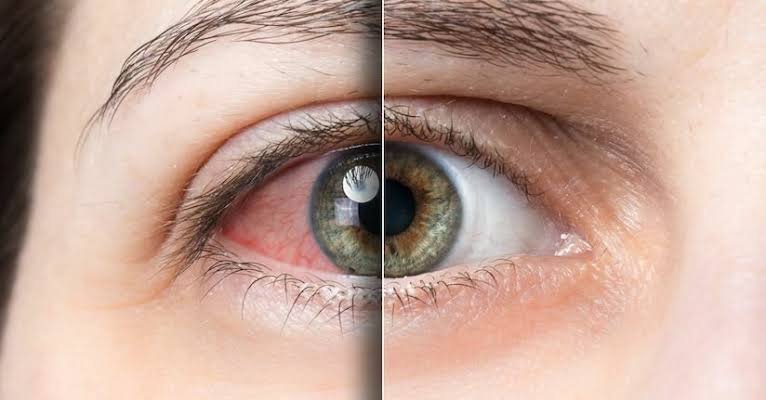
Digital Eye Strain vs Dry Eye: Quick Comparison
| Factor | Digital Eye Strain | Dry Eye |
|---|---|---|
| Main issue | Visual fatigue associated with prolonged screen/near work | Tear-film or ocular-surface problem |
| Common trigger | Extended computer, phone or tablet use | Multiple possible causes |
| Tired or aching eyes | Common | Possible |
| Gritty/burning sensation | Possible | Common |
| Blurred vision | Possible | Possible |
| Watery eyes | Possible | Possible |
| Headache | More commonly associated | Not usually the defining feature |
| Neck/shoulder discomfort | Can occur with prolonged device use | Not a typical dry-eye symptom |
| Improves after screen break | Often | May improve, but symptoms can persist |
| Can screens worsen it? | Yes | Yes |
What Is Digital Eye Strain?
Digital eye strain is sometimes called computer vision syndrome.
It refers to symptoms that can develop during or after prolonged digital-device use.
Possible symptoms include:
- Tired eyes
- Eye discomfort
- Blurred vision
- Difficulty refocusing
- Headaches
- Dry or irritated eyes
- Neck or shoulder discomfort
Several factors can contribute simultaneously.
Your eyes are performing sustained near-focus work, while poor lighting, glare, an unsuitable viewing distance or an uncorrected vision problem can make the task more demanding.
Posture can also contribute to headaches and neck discomfort during long computer sessions.
What Is Dry Eye?
The surface of the eye is covered by a thin tear film.
Tears do much more than appear when you cry. They help lubricate and protect the eye’s surface and contribute to clear vision.
Dry eye can develop when:
- The eyes do not produce enough tears
- Tears evaporate too quickly
- The tear film is unstable or does not function normally
Symptoms can include:
- Burning
- Stinging
- Grittiness
- Scratchiness
- Redness
- Intermittent blurred vision
- Sensitivity to light
- Watery eyes
Watery eyes may sound contradictory, but irritation from a dry ocular surface can sometimes trigger reflex tearing.
1. Look at What Triggers the Symptoms
The timing of symptoms can provide useful clues.
Suppose your eyes feel comfortable in the morning but become tired and blurry after several hours of studying on a laptop.
Digital eye strain may be contributing.
If burning, grittiness and irritation occur even when you are not using a screen, dry eye becomes another possibility.
However, this is not a diagnostic test.
Screen use itself can worsen dry eye, so someone may experience both conditions simultaneously.
2. Eye Fatigue Is More Suggestive of Digital Eye Strain
Digital tasks require sustained visual attention.
Your eyes repeatedly need to maintain focus at a relatively close distance.
Long periods of near work without breaks can therefore produce feelings such as:
- Heavy eyes
- Tired eyes
- Difficulty concentrating visually
- Temporary problems changing focus between near and distant objects
These symptoms often become more noticeable toward the end of a prolonged screen session.
Dry eye can also make the eyes feel tired, which is why symptoms need to be considered together.
3. Grittiness and Burning Point More Toward Dry Eye
A sensation that something is in the eye is commonly described with dry eye.
People may use words such as:
- Sandy
- Gritty
- Scratchy
- Burning
- Stinging
These sensations reflect irritation of the eye’s surface.
Digital eye strain can include dry-eye symptoms, but prominent burning and grittiness may indicate that tear-film problems are an important part of the issue.
4. Blurred Vision Can Occur With Both
Blurred vision does not neatly separate digital eye strain from dry eye.
With prolonged screen use, the visual system may become fatigued after sustained near focusing.
With dry eye, an unstable tear film can temporarily reduce the quality of the optical surface.
A useful observation is whether vision briefly becomes clearer after blinking.
If it does, tear-film instability may be contributing.
But persistent blurred vision should not automatically be blamed on screens or dryness. Refractive errors and eye conditions can also cause blurred vision.
5. Headaches May Be Related to Visual Strain
Headaches can occur during prolonged computer or other near work.
Possible contributing factors include:
- Sustained visual concentration
- An uncorrected vision problem
- Glare
- Poor workstation setup
- Poor posture
- Long periods without breaks
Headaches have many possible causes, so recurring headaches should not automatically be diagnosed as digital eye strain.
If they are frequent, severe or accompanied by other concerning symptoms, appropriate medical assessment is important.
6. Screens Can Reduce Effective Blinking
Blinking spreads the tear film across the surface of the eye.
When people concentrate on digital screens, they may blink less often or perform incomplete blinks.
That gives tears more opportunity to evaporate.
This explains one of the strongest connections between the two conditions:
Prolonged screen concentration → reduced/incomplete blinking → increased tear evaporation → dry-eye symptoms
Someone can therefore begin with digital eye strain and simultaneously experience dryness.
7. Air Conditioning Can Make Dryness Worse
Screen use is not always the only environmental factor.
Many people spend long periods working or studying in air-conditioned rooms.
Dry air and direct airflow from:
- Air conditioners
- Fans
- Car vents
can increase tear evaporation.
If your eyes become uncomfortable at a computer, check whether a fan or AC vent is blowing directly toward your face.
A small environmental adjustment may reduce irritation.
8. Contact Lenses Can Affect Comfort
Contact lenses sit on the surface of the eye and can contribute to dryness or discomfort in some wearers.
Long screen sessions may make this more noticeable because blinking behaviour changes during concentrated visual work.
If contact lenses repeatedly become uncomfortable, do not simply tolerate the irritation.
An eye-care professional can check:
- Lens fit
- Wearing schedule
- Eye surface
- Tear film
- Lens-care practices
Persistent redness or pain while wearing contacts needs particular attention.
9. Could Your Glasses Prescription Be the Problem?
Possibly.
An uncorrected or outdated prescription can increase visual effort during computer work.
Astigmatism, farsightedness and other refractive errors can contribute to symptoms in some people.
This is one reason that buying eye drops or special “computer glasses” without understanding the cause may not solve the problem.
An eye examination can determine whether vision correction is contributing.
10. Does Blue Light Cause Digital Eye Strain?
Blue light is frequently blamed for virtually every screen-related eye symptom.
However, the problem is more complicated.
Long periods of close visual work, reduced blinking, glare, viewing distance, lighting, posture and uncorrected vision can all contribute to digital eye strain.
Blue-light-filtering glasses should therefore not be treated as a guaranteed cure for eye strain.
Screen use late at night can also affect sleep timing, but that is a separate issue from claiming that ordinary screen blue light is physically damaging the eyes.
11. Can Taking Screen Breaks Help?
Regular breaks can reduce continuous near focusing.
A commonly discussed approach is the 20-20-20 rule:
After approximately 20 minutes of near work, look at something about 20 feet away for around 20 seconds.
You do not need to follow it with stopwatch-level precision.
The practical principle is:
Don’t perform uninterrupted close-up screen work for hours when you can periodically look away and change visual distance.
Getting up occasionally can also help with posture and general movement.
12. Remember to Blink
You normally do not need to consciously control every blink.
But during long screen sessions, occasionally reminding yourself to blink fully can help refresh the tear film.
This is particularly useful when your eyes start feeling dry.
You can also:
- Take short screen breaks
- Avoid direct fan or AC airflow
- Adjust the screen to a comfortable position
- Keep the room appropriately lit
These measures address several common contributors rather than blaming one factor.
13. Check Your Screen Position
A screen that is too close, too far away or awkwardly positioned can make computer work less comfortable.
For desktop or laptop use, the screen should generally be positioned at a comfortable viewing distance, with the display arranged so you do not need to maintain an awkward neck posture.
Text should also be large enough to read comfortably.
If you continually lean toward the screen to read, increasing text size may be more useful than simply tolerating the strain.
14. Should You Use Lubricating Eye Drops?
Lubricating or artificial-tear products can help some people with dry-eye symptoms.
However, there are many types of eye drops, and not every red or irritated eye is caused by dryness.
Avoid repeatedly using random medicated or “redness-removing” drops without knowing what is causing the problem.
If symptoms are persistent, an optometrist or ophthalmologist can assess the eye surface and recommend an appropriate approach.
How Can You Tell Which Problem You Have?
Consider the overall pattern.
Digital eye strain may be more likely when:
- Symptoms appear mainly after prolonged screen use.
- Your eyes feel tired after near work.
- You develop headaches during computer work.
- You have difficulty refocusing after long sessions.
- Symptoms improve substantially after resting your eyes.
Dry eye may be more likely when:
- Burning or grittiness is prominent.
- Your eyes frequently feel scratchy.
- Symptoms occur away from screens too.
- Wind, fans or air conditioning worsen symptoms.
- Blinking temporarily improves blurry vision.
But these are clues, not a substitute for an eye examination.
You can have both.
When Should You See an Eye Doctor?
Arrange an eye examination when symptoms:
- Persist despite reasonable screen adjustments
- Frequently interfere with studying or normal activities
- Include recurring blurred vision
- Are associated with significant redness
- Occur regularly while wearing contact lenses
- Keep getting worse
Seek prompt medical attention for symptoms such as significant eye pain, sudden loss or major change in vision, an eye injury, or other sudden concerning eye symptoms.
Children and teenagers with recurring headaches or blurred vision during schoolwork should tell a parent or guardian and have their vision appropriately assessed rather than assuming screens are the only cause.
Digital Eye Strain and Dry Eye Often Overlap
The simplest distinction is that digital eye strain describes symptoms associated with prolonged digital visual tasks, while dry eye involves inadequate or unstable lubrication of the eye’s surface.
But the relationship goes both ways.
Long periods of screen use can reduce effective blinking and worsen dryness. Dry eyes can then make screen use more uncomfortable, contributing to greater visual fatigue.
Instead of focusing on one quick fix, consider the complete setup:
screen time + breaks + blinking + lighting + viewing distance + airflow + vision correction + eye health
If symptoms disappear after sensible changes and breaks, the problem may be relatively minor. If burning, blurred vision, pain, significant redness or other symptoms persist, an eye-care professional can determine whether dry eye, a refractive problem or another eye condition is responsible.
FAQs
Q1. What is the main difference between digital eye strain and dry eye?
A. Digital eye strain is a collection of symptoms associated with prolonged screen or near work, while dry eye involves problems with the quantity, quality or stability of the tear film covering the eye. The two conditions can occur together.
Q2. Can too much screen time cause dry eyes?
A. Prolonged screen concentration can contribute to dryness because people may blink less frequently or incompletely while using digital devices. This can allow tears to evaporate more quickly.
Q3. Why does my vision become blurry after looking at a computer?
A. Temporary blurred vision may occur because of prolonged near focusing or an unstable tear film. An uncorrected vision problem can also contribute. Recurring or persistent blurred vision should be assessed by an eye-care professional.
Q4. Do blue-light glasses prevent digital eye strain?
A. They should not be considered a guaranteed solution. Digital eye strain can involve prolonged near work, reduced blinking, glare, lighting, posture and vision problems, so addressing these factors is generally more important than relying solely on a blue-light filter.
Q5. When should I see an eye doctor for screen-related symptoms?
A. Arrange an eye examination if symptoms persist, repeatedly interfere with normal activities, or include recurring blurred vision or significant redness. Sudden major vision changes, significant eye pain or an eye injury require prompt medical attention.