Manipur’s e-governance journey reached a significant turning point in May 2026. The state that built its e-District system through eservicesmanipur.gov.in — delivering over 34 lakh transactions across 35 services from 9 departments — officially launched a next-generation successor: the e-Seba Manipur Portal at esebamanipur.mn.gov.in. From 11 May 2026, by government notification (No.: DI-401/2/2023-DITC-DIT), all new applications for Revenue certificates and Employment Exchange services must be submitted exclusively through the new e-Seba portal.
This article covers the complete picture: what the original e-District Manipur portal was, what services it delivered, why the e-Seba migration happened, how citizens register and apply on the new platform, and how pending applications from the old system are being handled. Whether you are searching for “e-District Manipur” or “eservicesmanipur.gov.in” in 2026, this guide tells you exactly where to go and what to do.
What Is the e-District Manipur System?
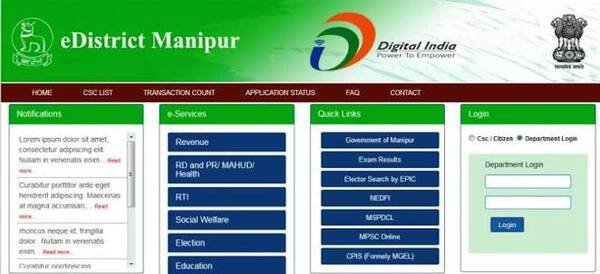
The e-District Manipur initiative was launched by the Government of Manipur under the e-District Mission Mode Project — a key component of India’s National e-Governance Plan (NeGP). The original portal at eservicesmanipur.gov.in (with a specific e-District interface at eservicesmanipur.gov.in/eda/) was described officially as “a web application service devised by different departments of the Government of Manipur to enable online submission of different services, thereby creating an electronically enabled backbone for the effective management of data records in the state.”
The platform integrated services from 9 government departments and enabled citizens across all of Manipur’s districts to apply for income certificates, domicile certificates, Permanent Residence Certificates, SC/ST/OBC certificates, birth and death certificates, employment exchange services, and more — without visiting district or sub-district offices. Over its operational years, it recorded more than 34 lakh transactions, establishing a foundation for digital governance in one of India’s most administratively complex northeastern states.
The 2026 Transition to e-Seba Manipur
The most important update for citizens in 2026 is the portal transition:
| Old System | New System | |
| Portal name | e-Services / e-District Manipur | e-Seba Manipur |
| URL | eservicesmanipur.gov.in/eda/ | esebamanipur.mn.gov.in |
| New applications | Discontinued from 11 May 2026 | Active from 11 May 2026 |
| Pending applications (old system) | Continue to be processed until completion | N/A |
| Technology | Earlier e-District framework | Next-generation unified platform |
Critically: Applications already submitted through the old portal that are pending certificate issuance will continue to be processed until completion. Citizens must not submit fresh applications on the old portal after 11 May 2026.
The e-Seba Manipur Portal was officially inaugurated by Chief Minister Yumnam Khemchand Singh on 16 April 2026, alongside three other digital platforms — the Centralised RTI State Portal, Explore Manipur, and an AI-enabled Scheme Finder.
Services Available — Complete List
Revenue Department Certificates (Now through e-Seba)
Per the official government notification (4 May 2026), the following Revenue certificates are exclusively available through the e-Seba Manipur Portal from 11 May 2026:
| Certificate | Purpose |
| Domicile Certificate | Proof of permanent residence in Manipur |
| Income Certificate | Annual family income certification |
| OBC Certificate | Other Backward Classes community certification |
| Permanent Resident Certificate (PRC) | Proof of permanent residence for tribal and SC/ST communities |
| Scheduled Caste (SC) Certificate | SC community certification |
| Scheduled Tribe (ST) Certificate | ST community certification |
Employment Exchange Services (Now through e-Seba)
- Fresh Registration in Employment Exchange
- Renewal of Registration
- Updation of Qualification and Experience
- Transfer of Registration to another Employment Exchange
- Application against notified vacancies
Other Services (Original e-District Scope — 9 Departments)
The broader e-District Manipur system covered services from 9 departments including:
- Revenue Department: All certificates listed above
- Social Welfare Department: Old Age Pension (Manipur State and National), Indira Gandhi National Widow Pension Scheme
- Election Department: Inclusion in Electoral Roll, Correction of Particulars, Deletion/Objection of Name, Transposition of Entry, Service Electoral Roll
- Registration Department: Marriage Certificate under Hindu Marriage Act, Marriage Certificate under Special Marriage Act, Non-Encumbrance Certificate, Register of Deeds
Key Certificates — Detailed Breakdown
Permanent Resident Certificate (PRC)
The PRC in Manipur is the most important document for residents of the state, particularly for tribal community members. It certifies permanent residence in Manipur and is required for:
- Government job applications in Manipur under state quota and reserved category
- Educational institution admissions under state and reserved category quotas
- Access to tribal land tenure rights and land transaction eligibility in hill areas
- Scholarship scheme eligibility
- Government welfare scheme eligibility restricted to Manipur permanent residents
The e-Seba portal help documentation specifies that Jamabandi or Patta (official land/property record from the Revenue Department) is required for PRC applications — it serves as proof of property ownership or residence. Citizens are advised to obtain an up-to-date copy from their local Revenue Office before applying.
Documents Required for PRC:
- Aadhaar Card (mandatory)
- Jamabandi / Patta (land/property document from Revenue Office)
- Birth Certificate or School Certificate
- Residential proof (Ration Card, Electricity Bill, any document issued by DC/SDO office)
- Community proof documents (for tribal communities)
- Photograph
Domicile Certificate
The Domicile Certificate certifies permanent residence in Manipur. Required for:
- State government job applications under domicile-based eligibility
- Educational admissions requiring Manipur domicile proof
- Government schemes with Manipur residency eligibility
Documents Required:
- Aadhaar Card
- Proof of residence in Manipur (Ration Card, Electricity Bill, Patta, or any DC/SDO issued document)
- Photograph
Income Certificate
The Income Certificate certifies total annual family income from all sources. Required for:
- All scholarship applications — state and central government
- Fee waiver and concession in educational institutions
- Government welfare scheme eligibility with income limits
- BPL card eligibility
SC/ST Certificate
The SC and ST Certificates certify community membership for reservation and welfare scheme benefits. Required for:
- SC/ST reservation in government jobs
- SC/ST quota in educational institutions
- Scholarship scheme eligibility under SC/ST category
- Welfare scheme benefits for SC/ST communities
Important Note from the e-Seba portal help system: If a caste certificate number is not available, enter “N/A” in that field — do not leave mandatory fields blank or the application will fail.
OBC Certificate
The OBC (Other Backward Classes) Certificate certifies OBC community membership in Manipur. Required for:
- OBC reservation in Manipur state government jobs
- OBC quota in educational institutions
- Non-Creamy Layer determination for central government OBC benefits
How to Register on the e-Seba Manipur Portal
The e-Seba portal uses Aadhaar-based registration — a significant advance over the older e-Services portal. Your Aadhaar card and the mobile number linked to it are mandatory for registration.
Step 1 — Visit the Portal
Open esebamanipur.mn.gov.in in Google Chrome or Mozilla Firefox on a desktop or laptop (recommended by the portal help guide).
Step 2 — Click Register Here
On the login page, click “Register here” to begin new citizen registration.
Step 3 — Enter Aadhaar-Linked Mobile Number
Enter your 12-digit Aadhaar-linked mobile number, solve the captcha math problem, and click “Send OTP.”
Step 4 — Aadhaar and OTP Verification
Enter your 12-digit Aadhaar Number and the 6-digit OTP received on your mobile number, then click “Verify OTP.”
Step 5 — Auto-Filled Personal Details
Your Full Name, Date of Birth, Gender, Address, and Father’s Name are automatically filled from the Aadhaar database — these fields cannot be edited on the portal. If there is an error in any of these, it must be corrected in your Aadhaar record first.
Step 6 — Fill Remaining Details
Complete the remaining mandatory fields:
- Email ID
- Marital Status
- Mother’s Name
- Caste Category
- Religion
- Area (urban/rural)
Step 7 — Registration Complete
Submit. Your citizen account is created on the e-Seba portal.
How to Apply for Certificates on e-Seba Manipur
Step 1 — Log In
Visit esebamanipur.mn.gov.in. Log in with your registered mobile number/username and password.
Step 2 — Dashboard Overview
On login, your dashboard shows four summary cards with a quick overview of your application activity — applied, pending, approved, and rejected.
Step 3 — Navigate to Services
From the sidebar, select the service category — Revenue Department for certificates. Select the specific certificate: Domicile, Income, OBC, PRC, SC, or ST.
Step 4 — Fill the Application Form
Complete all mandatory fields. The portal marks required fields clearly — any red “Required” warning near a field indicates incomplete mandatory information. Key sections:
- Personal details (auto-filled from Aadhaar, cannot be edited)
- Residential address in Manipur (District, Sub-Division, Block, Village/Ward)
- Service-specific details (income from all sources for income certificate; community details for SC/ST/OBC)
- Processing Office: Select your district first, then choose the appropriate office (e.g., the Revenue Office in your district). This is the government office that will review and process your application — choosing the correct office is critical.
Step 5 — Save Draft or Submit
“Save All” saves your progress as a draft — the application is not submitted and can be edited later. “Submit Application” finalises and officially lodges your application for government processing — the application cannot be edited after submission.
Step 6 — Upload Documents
Attach all required documents. Portal upload guidelines:
- Photo: reduce resolution to approximately 480×640 pixels to keep under 100 KB
- Scanned PDFs: scan at 150 DPI (not 300 DPI) to keep file sizes manageable
- For Jamabandi/Patta: obtain an up-to-date copy from the local Revenue Office before uploading
How to Check Application Status
After submission, track your application through:
Through the Portal Dashboard:
Log in to esebamanipur.mn.gov.in. From the sidebar, go to Applications → Applied List. All submitted applications appear with their current status. Draft applications also appear here with “Draft” status.
Status Messages:
- Submitted — Application received, awaiting processing office action
- Processing — Under review by the designated government officer
- Approved — Certificate ready for download
- Rejected — Check the Rejected List for the rejection reason; correct and reapply as a new application
- Draft — Application saved but not yet submitted
If application is stuck as “Submitted”: Processing times vary by department and officer availability. Contact the Processing Office selected in your application for follow-up.
How to Download Your Certificate
Once approved:
Step 1 — Log in to esebamanipur.mn.gov.in.
Step 2 — Go to Sidebar → Applications → Applied List.
Step 3 — Find the approved application and click the download option.
Step 4 — The digitally signed certificate downloads as a PDF — legally valid for all official purposes across India under the IT Act, 2000.
For applications submitted through the old eservicesmanipur.gov.in portal that were already approved before 11 May 2026, certificates can still be downloaded from the old portal using the original application reference number.
Pending Applications from the Old Portal
Citizens who submitted applications through the old eservicesmanipur.gov.in portal before 11 May 2026 do not need to reapply. The Government of Manipur has confirmed that applications already submitted in the old system will continue to be processed until completion — specifically in cases where certificate issuance is pending or incomplete. Only new applications after 11 May 2026 must go through e-Seba.
Common Service Centres (CSCs) — Offline Access
For citizens without internet access or those needing assisted service, Common Service Centres across Manipur’s districts and sub-districts provide operator-assisted e-Seba / e-District applications. The official help guide for e-Seba recommends using CSCs for citizens unfamiliar with the online process.
For the original e-District system, CSCs operating under the Churachandpur, Bishnupur, Kangpokpi, and other district administrations provided access to all 9 departmental services. The same network continues to serve citizens for the e-Seba transition.
Important URLs and Contact Details
| Purpose | URL |
| e-Seba Manipur (Active Portal — 2026) | esebamanipur.mn.gov.in |
| Old e-District / e-Services Portal | eservicesmanipur.gov.in/eda/ |
| e-Seba Help Information Centre | esebadepartment.mn.gov.in/Page/HelpInformation |
| Manipur Government Portal | manipur.gov.in |
| UMANG (e-District Manipur services) | web.umang.gov.in |
| Contact (e-Seba) | “CONTACT US” in top navigation on esebamanipur.mn.gov.in landing page |
Common Problems and Solutions
Trying to apply on old portal after 11 May 2026: The old eservicesmanipur.gov.in portal no longer accepts new applications. All new certificate and employment exchange applications must be submitted through esebamanipur.mn.gov.in.
OTP not received during registration: Confirm your mobile number is currently active and linked to Aadhaar. Check network signal. Click “Resend OTP” after waiting — do not attempt multiple OTP requests in quick succession.
Name/Date of Birth cannot be edited: These details are automatically fetched from Aadhaar and locked. If there is an error, correct it in your Aadhaar record at a nearby Aadhaar Seva Kendra first, then return to e-Seba registration.
Caste certificate number not available: Enter “N/A” in that mandatory field. Do not leave it blank.
File size too large for upload: For photos, reduce resolution to approximately 480×640 pixels. For scanned PDFs, scan at 150 DPI instead of 300 DPI.
Cannot find draft application: Go to Sidebar → Applications → Applied List and filter for applications with “Draft” status.
Processing office selection confusion: Select your district first, then the appropriate office within that district. Choosing the wrong processing office routes your application incorrectly and causes delay.
Conclusion
The e-District Manipur system at eservicesmanipur.gov.in laid the foundation for digital certificate delivery across the state — 34 lakh transactions, 9 integrated departments, and services reaching citizens in hill districts and valley regions alike. The May 2026 transition to the e-Seba Manipur Portal at esebamanipur.mn.gov.in represents a significant upgrade: Aadhaar-based registration with auto-filled personal details, a unified platform for Revenue and Employment Exchange services, and a cleaner application workflow.
For any Manipur resident needing a government certificate from 11 May 2026 onwards — income, domicile, PRC, SC, ST, or OBC — the destination is esebamanipur.mn.gov.in. Register with your Aadhaar-linked mobile, allow the system to auto-fill your details, apply for the certificate, upload documents at recommended resolution, select the correct processing office, submit, and track through the dashboard.
FAQs About e-District Manipur / e-Seba Portal
Q1. What is the current official website for e-District Manipur in 2026?
A. From 11 May 2026, all new certificate applications must be submitted through the e-Seba Manipur Portal at esebamanipur.mn.gov.in. The old e-District/e-Services portal at eservicesmanipur.gov.in/eda/ no longer accepts new applications. Applications submitted before 11 May 2026 and still pending issuance will continue to be processed on the old system.
Q2. What is e-Seba Manipur and why was it launched?
A. e-Seba Manipur is a next-generation unified digital service platform launched by Chief Minister Yumnam Khemchand Singh on 16 April 2026. It was officially notified as the sole platform for Revenue certificates and Employment Exchange services from 11 May 2026. It replaces the older fragmented e-Services portal, consolidating services under a single system with Aadhaar-based registration, auto-filled personal details, and improved application tracking.
Q3. Which certificates are available through the e-Seba / e-District Manipur portal?
A. The Revenue certificates available include Domicile Certificate, Income Certificate, OBC Certificate, Permanent Resident Certificate (PRC), Scheduled Caste (SC) Certificate, and Scheduled Tribe (ST) Certificate. Employment Exchange services, including fresh registration, renewal, qualification updates, transfer of registration, and vacancy applications, are also available.
Q4. How do I register on the e-Seba Manipur Portal?
A. Visit esebamanipur.mn.gov.in and click “Register here.” Enter your Aadhaar-linked mobile number, solve the captcha, and receive an OTP. Enter your Aadhaar number and OTP for verification. Personal details such as name, date of birth, gender, address, and father’s name are automatically pulled from Aadhaar and cannot be edited. Fill in the remaining fields, including email, marital status, mother’s name, caste, religion, and area, and submit the registration.
Q5. What should I do if I submitted an application on the old portal before 11 May 2026?
A. Do not reapply. The Government of Manipur has confirmed that applications already submitted through the old eservicesmanipur.gov.in portal will continue to be processed until completion, specifically for cases where certificate issuance is still pending. Only new applications from 11 May 2026 onwards must go through the e-Seba portal.
Q6. Why can’t I edit my name or date of birth during e-Seba registration?
A. Name, date of birth, gender, and father’s name are automatically fetched from the Aadhaar database during registration and are locked on the e-Seba portal. These fields cannot be edited on the portal. If there is an error, it must first be corrected in your Aadhaar record at an Aadhaar Seva Kendra, after which you can register on e-Seba.