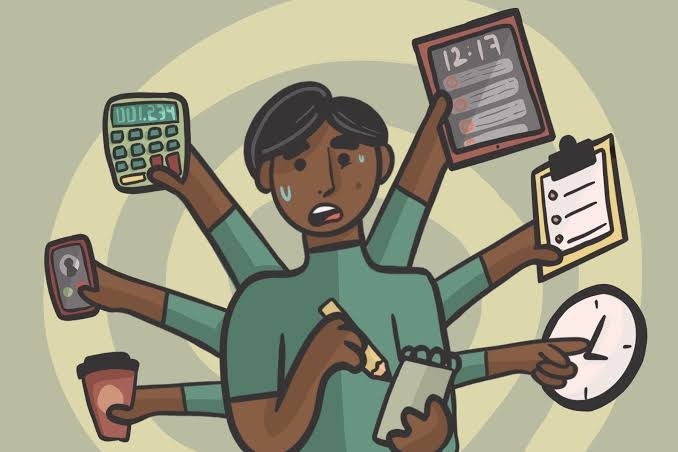
A planner only works when you actually check it. A beautifully organised notebook sitting unopened in a drawer is less useful than a basic phone calendar you look at every day. The reverse is also true: an advanced planning app packed with reminders and categories may not help if notifications are constantly ignored.
That makes the choice between a digital planner and a paper planner less about which format has more features and more about which one fits naturally into your day.
Digital planners are particularly strong at reminders, recurring tasks, editing and accessing information across devices. Paper planners offer simplicity, fewer digital distractions and the freedom to organise a page exactly as you want.
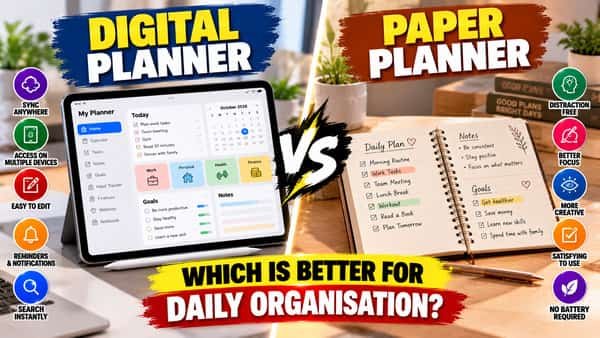
For many people, either can work well—and a simple combination of the two can sometimes be even more practical.
Digital Planner vs Paper Planner: Quick Comparison
| Factor | Digital Planner | Paper Planner |
|---|---|---|
| Reminders | Excellent | Manual |
| Editing tasks | Easy | May require crossing out/rewriting |
| Recurring events | Easy to automate | Must be entered repeatedly |
| Search | Fast | Manual |
| Digital distractions | Possible | Minimal |
| Customisation | Depends on app | Very flexible |
| Device required | Yes | No |
| Sharing | Easy | Limited |
| Backup | Often available | Usually no automatic backup |
| Best for | Dynamic schedules | Focused personal planning |
What Is a Digital Planner?
A digital planner can be a calendar, task-management app, note-taking system or dedicated planning application.
It may run on:
- Smartphones
- Tablets
- Laptops
- Desktop computers
- Smartwatches
Some systems combine calendars, reminders, tasks and notes.
A major advantage is automation. You can create an appointment once and ask the software to remind you before it happens.
That makes digital planning particularly useful for schedules containing many deadlines and time-specific commitments.
What Is a Paper Planner?
A paper planner is a physical notebook, diary, calendar or purpose-designed planner used to record schedules and tasks.
It might have:
- Daily pages
- Weekly layouts
- Monthly calendars
- To-do sections
- Notes
- Habit trackers
Some people prefer completely blank notebooks and create their own system.
Unlike an app, paper does not send notifications or automatically move unfinished tasks. Its simplicity is simultaneously its biggest limitation and one of its strongest advantages.
1. Digital Planners Are Better for Reminders
Suppose you have an appointment next Thursday at 4 p.m.
Writing it in a notebook helps only if you remember to check the notebook.
A digital calendar can provide notifications:
- A day before
- An hour before
- At a chosen time
This makes digital planning especially useful for events that must happen at specific times.
Examples include:
- Appointments
- Classes
- Meetings
- Assignment deadlines
- Bill dates
- Travel schedules
Better for reminders: Digital planner
2. Paper Planners Can Reduce Digital Distractions
Opening a planning app means opening a device that may also contain:
- Social media
- Messages
- Games
- Videos
- News
You may open your phone to check tomorrow’s schedule and find yourself doing something completely unrelated a few minutes later.
Paper eliminates this problem.
You open the planner and see the planner.
For someone who is easily distracted by notifications or apps, this separation can make paper particularly useful.
Better for distraction-free planning: Paper planner
3. Digital Plans Are Easier to Change
Daily schedules rarely go exactly as expected.
A meeting moves from Tuesday to Wednesday. A task gets postponed. An appointment changes time.
Digitally, changing it may take a few seconds.
You can:
- Drag an event
- Change its date
- Edit the time
- Update its description
- Change its priority
With paper, repeated changes can create crossed-out entries and clutter.
If your schedule changes frequently, digital planning generally handles those changes more gracefully.
Better for frequently changing schedules: Digital planner
4. Paper Gives You More Freedom on the Page
A paper notebook does not force you to follow an application’s structure.
You can combine:
- Tasks
- Notes
- Arrows
- Boxes
- Sketches
- Timelines
- Ideas
in whatever layout makes sense.
This can be useful for people who think visually or prefer planning without menus and predefined categories.
Digital apps can also be highly customisable, but greater customisation can sometimes mean spending more time configuring the system.
Better for free-form planning: Paper planner
5. Digital Planners Handle Recurring Tasks Better
Some events repeat automatically.
For example:
Every Monday — class
Every month — subscription payment
Every Friday — project review
A digital planner can often create the event once and repeat it automatically.
With paper, you generally need to write recurring events again when preparing each new week or month.
That may not matter for a simple schedule, but automation becomes useful when you have many repeating commitments.
6. Searching Is Much Easier Digitally
Imagine trying to find notes from a meeting six months ago.
In a digital system, you may be able to search the meeting title or keyword.
In a paper planner, you need to remember approximately when you wrote it and turn through the pages.
Digital search becomes increasingly valuable when your planner contains months or years of information.
Better for finding old information: Digital planner
7. Paper Does Not Depend on Battery Life
A notebook does not:
- Run out of battery
- Require charging
- Need Wi-Fi
- Need software updates
- Become inaccessible because an app will not open
This makes paper remarkably dependable for basic planning.
However, physical planners have a different vulnerability.
They can be:
- Lost
- Damaged
- Left at home
- Exposed to water
And unless you manually photograph or copy the pages, there may be no backup.
8. Digital Planners Can Synchronise Across Devices
Cloud-based planning systems can make the same schedule available on several devices.
You might create an appointment on a laptop and later view it on your phone.
This is particularly convenient when you move between:
- Home
- School or college
- Work
- Travel
Changes can also appear across devices automatically.
Paper is physically tied to one object. If the notebook is at home, the information is at home too.
9. Which Is Better for Students?
Both formats can work.
A digital planner may be particularly useful for:
- Assignment deadlines
- Exam dates
- Class schedules
- Project reminders
- Recurring classes
Paper can be useful for:
- Daily study priorities
- Breaking assignments into smaller tasks
- Writing a simple weekly plan
- Planning without phone distractions
Students do not need an elaborate productivity system.
A calendar containing important deadlines plus a short daily task list may be enough.
10. Which Is Better for Work?
Digital systems often have an advantage when work involves collaboration.
Meetings can be:
- Shared
- Updated
- Rescheduled
- Accepted
- Declined
Teams may also use shared task-management systems.
A private paper planner cannot replace a shared workplace calendar when colleagues need to know your availability.
However, paper can still be useful for writing down your own priorities during the working day.
The two formats can therefore complement each other.
11. Which Is More Affordable?
Paper planners range from inexpensive notebooks to premium planners.
Digital planning also ranges from free built-in calendar applications to paid productivity subscriptions.
If you already own a phone or computer, a basic digital calendar may involve no additional cost.
Likewise, effective paper planning requires nothing more sophisticated than an ordinary notebook and pen.
Do not assume you need an expensive planner—digital or physical—to become organised.
Organisation comes from using the system consistently, not from buying the most elaborate version.
12. Can Too Many Planning Features Become a Problem?
Yes.
Digital planning tools can offer:
- Tags
- Colours
- Priorities
- Projects
- Subtasks
- Dashboards
- Integrations
- Automations
These features can be useful.
But it is possible to spend more time organising the planning system than completing the tasks inside it.
The same problem can occur with paper when someone spends excessive time creating decorative layouts instead of using the planner practically.
A planner should reduce work, not become another major task.
13. Don’t Schedule Every Minute
A daily planner can become unrealistic when every part of the day is allocated precisely.
Unexpected events happen.
A task may take longer than expected. Someone may call. Travel may be delayed. You may simply need a break.
Leaving some unscheduled space makes the plan more adaptable.
This is particularly important for students and teenagers. Planning should support adequate sleep, meals, schoolwork, movement, social time and relaxation rather than turning the entire day into a productivity target.
14. Use One Place for Important Commitments
One common organisational problem is having information scattered everywhere.
For example:
- Appointment in phone calendar
- Homework in notebook
- Meeting in email
- Reminder on a sticky note
- Another task saved in messages
Some separation is unavoidable, but important time-specific commitments should ideally have one reliable home.
You should know where to look when asking:
“What absolutely needs to happen today?”
That single habit can matter more than whether the planner is digital or paper.
15. A Hybrid System Can Give You Both Advantages
You do not necessarily have to choose one format.
A simple hybrid system can work well:
Use digital for:
- Appointments
- Deadlines
- Recurring events
- Reminders
- Shared schedules
Use paper for:
- Today’s priorities
- Notes
- Brainstorming
- Study planning
- Personal reflections
For example, your phone calendar might tell you where you need to be and when, while your notebook tells you what you want to accomplish today.
The key is keeping the system simple enough that information does not become fragmented across too many places.
Digital or Paper: Which Should You Choose?
Choose a digital planner if you:
- Need frequent reminders.
- Have a changing schedule.
- Manage many recurring events.
- Want access across devices.
- Need to share calendars with others.
- Regularly search previous notes or events.
Choose a paper planner if you:
- Prefer handwriting.
- Want fewer screen distractions.
- Have a relatively simple schedule.
- Like flexible page layouts.
- Remember information better when writing it down.
- Want a clear separation from digital devices.
Choose a hybrid system if you:
Want automated scheduling without giving up the simplicity of handwriting.
For many people, digital calendar + short paper daily list is enough. There is little benefit in maintaining several apps, multiple notebooks and complicated productivity dashboards unless they solve a genuine problem.
How to Make Any Planner Work Better
Whichever format you choose, a few basic habits make planning more useful.
Capture important commitments immediately. Do not rely on remembering them later.
Check your planner regularly. A planner that is never reviewed cannot organise your day.
Keep daily priorities realistic. A list of three important tasks you can actually complete is often more useful than twenty tasks carried forward repeatedly.
Separate appointments from flexible tasks. A 3 p.m. appointment belongs at 3 p.m.; “organise notes” may simply need to happen sometime that day.
Review tomorrow before finishing today. A brief check can prevent forgotten commitments.
The best planner is ultimately the one that becomes boringly reliable. You know where your commitments are recorded, you check them without thinking about it, and the system helps you act rather than giving you another thing to organise.
FAQs
Q1. Is a digital planner better than a paper planner?
A. A digital planner is generally better for reminders, recurring events, editing and synchronisation, while paper can be better for distraction-free and free-form planning. The better option depends on how you organise your day.
Q2. Does writing tasks on paper help with organisation?
A. It can. Writing creates a simple, visible task list without digital distractions. However, paper does not automatically provide reminders, so you still need to check the planner consistently.
Q3. Are digital planners good for students?
A. Yes. Digital calendars can be particularly useful for recording class schedules, exams, assignment deadlines and reminders. Students can also combine a digital calendar with a short paper study or task list.
Q4. Is it okay to use both a digital and paper planner?
A. Yes. A hybrid system can work well when each format has a clear purpose—for example, digital tools for appointments and deadlines and paper for daily priorities and notes.
Q5. How do I choose a planner that I will actually use?
A. Choose the simplest system that handles your real needs. If you frequently forget appointments, prioritise reminders. If devices distract you, paper may work better. Test the system for normal daily life before adding more apps, categories or planning features.