Himachal Pradesh is a mountain state. Its 68 lakh residents are spread across 12 districts, 117 tehsils, 83 sub-divisions, and thousands of villages across steep valleys, high-altitude terrain, and some of the most geographically isolated communities in northern India. For a resident of a remote village in Lahaul-Spiti, Kinnaur, or Chamba, getting to a Tehsil office for a government certificate was never a simple errand. It meant travel, time, and uncertainty — and then travel back if documents were insufficient.
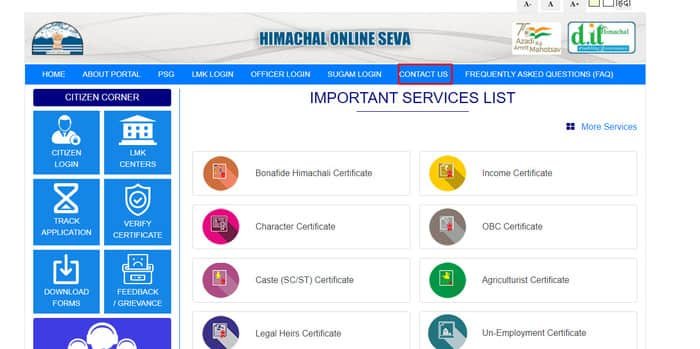
The e-District HP portal addresses that geography head-on. Available at himseva.hp.gov.in, it is the Government of Himachal Pradesh’s official online platform for citizen certificates and services — known as HimSeva, meaning “Service to Himachal.” From income certificates to Bonafide Himachali Certificates, OBC certificates to character certificates, legal heir certificates to BPL cards, Himachal Pradesh residents can apply, track, and download government documents online from anywhere with an internet connection. For those without internet access, a network of Lok Mitra Kendras (LMKs) across the state provides assisted service at the block level.
The project received the Best Public Service Initiative Award at the Digital India Summit 2019 — recognition not just for technology but for meaningful reach into one of India’s most geographically challenging states.
This guide covers everything a Himachal Pradesh resident needs to know about the e-District HP / HimSeva portal in 2026: what it is, the HimSeva and HimAccess systems, the complete service list by department, how to register and apply, document requirements for each major certificate, how to track status, and how to resolve common problems.
What Is the e-District HP Portal (HimSeva)?
The e-District HP portal, now operating as HimSeva at himseva.hp.gov.in, is the official Government of Himachal Pradesh digital platform for citizen-centric service delivery. It was developed under the National e-Governance Plan (NeGP) as a Mission Mode Project, implemented by the Department of Digital Technologies and Governance (formerly the Department of Information Technology), Government of Himachal Pradesh.
The portal is described officially as being created to “enhance the efficiencies of various Departments at the district level to enable seamless service delivery to the citizen.” Citizen Facilitation Centres have been established at District, Tehsil, Sub-Division, and Block levels, with village-level access provided through Lok Mitra Kendras (LMKs) functioning as Common Service Centres.
HimSeva vs. Old e-District HP — 2026 Status
The portal that was previously known as e-District Himachal Pradesh (edistrict.hp.gov.in) has been upgraded and rebranded as HimSeva. The old URL edistrict.hp.gov.in now automatically redirects to himseva.hp.gov.in. For all practical purposes, HimSeva is the current active e-District HP portal, and all services, applications, and certificate downloads are managed through himseva.hp.gov.in.
HimAccess — Single Sign-On System
HimAccess is the Single Sign-On (SSO) authentication system of Himachal Pradesh, giving citizens a unified login credential that works across multiple HP government portals without separate registrations for each. Citizens who use HimAccess can access HimSeva and other HP government digital platforms through one set of credentials — a significant convenience improvement over the traditional portal-by-portal registration model.
Complete List of Services on e-District HP (HimSeva)
The portal organises services by department. Multiple departments deliver services through the HimSeva platform:
Revenue Department (Largest and Most Used)
The Revenue Department provides the majority of certificates citizens regularly need:
| Service | Purpose |
| Bonafide Himachali Certificate | Proof of permanent residence in HP — for jobs, education, schemes |
| Income Certificate | Annual family income certification |
| Caste (SC/ST) Certificate | Scheduled Caste / Scheduled Tribe certification |
| Other Backward Class (OBC) Certificate | OBC community certification |
| Character Certificate | Proof of good character and conduct |
| Domicile Certificate | Proof of HP domicile |
| Rural Area Certificate | Certification of residing in a rural area |
| Backward Area Certificate | Certification for residents of backward/notified areas |
| Agriculturist Certificate | Certification of agricultural occupation |
| Dogra Class Certificate | Certification for Dogra community members |
| Minority Community Certificate | Certification of belonging to a minority community |
| Freedom Fighter Certificate | Certification for freedom fighters and dependants |
| Indigent (Needy Person) Certificate | Certification of financial neediness |
| Legal Heirs Certificate | Identification of legal successors of deceased |
| Copy of Nakal | Certified copy of land record (Khasra/Khatauni) |
| Copy of Record of Rights | Certified copy of property rights document |
SC, OBC and Minority Affairs Department
| Service | Purpose |
| Disability Identity Card | Identity card for persons with disabilities |
| Senior Citizen Identity Card | Identity card for citizens aged 60 and above |
Rural Development Department
| Service | Purpose |
| BPL Card Issuance | Below Poverty Line card for eligible families |
| MGNREGA Registration | Registration of rural worker under MGNREGA scheme |
| MGNREGA Work Demand | Demanding work under the MGNREGA scheme |
Urban Development Department
| Service | Purpose |
| Urban area BPL Card | Below Poverty Line card for urban families |
| Urban development related services | Various urban citizen services |
Revenue Court Services
| Service | Purpose |
| Revenue Court Case Registration | Online registration of Revenue Court cases |
| Status Monitoring | Tracking of court case progress |
| Case History Recording | Digital recording of case history |
| Cause List | Online viewing and uploading of court cause lists |
| Judgement Download/Upload | Accessing judgements from Revenue Courts |
Water Bill Payment
Citizens can pay water bills directly through the portal without visiting any office. Click the “Pay Water Bill” tab on the portal homepage, enter the bill number, and proceed with payment.
The Bonafide Himachali Certificate — HP’s Most Important Document
Among all certificates available on the e-District HP portal, the Bonafide Himachali Certificate deserves the most detailed explanation because it is uniquely significant to Himachal Pradesh and is the gateway to virtually every state-specific benefit and reservation.
What Is the Bonafide Himachali Certificate?
The Bonafide Himachali Certificate is an official government document that certifies a person is a permanent resident of Himachal Pradesh. It is issued in Form-G — a standardised HP Revenue Department format — by the Tehsildar or Sub-Divisional Magistrate (SDM) of the applicant’s area. The certificate essentially functions as the HP domicile certificate but carries specific eligibility criteria defined by the state government.
Why It Matters
Without a Bonafide Himachali Certificate, HP residents cannot access:
- State government job reservations for HP residents
- Himachal Pradesh College Entrance Test (HPCET) — state quota engineering admissions
- HP University, HPTU, and other HP government university admissions under state quota
- HP government scholarship schemes available only to state residents
- Subsidised rates for HP government housing, land allotment, and welfare schemes
- Multiple benefits under Himachal Pradesh-specific programmes that require proof of permanent HP residency
The certificate is valid for a lifetime — once obtained, it does not need renewal.
Fee: Rs. 55
Issuing Authority: Tehsildar or SDO (Civil)/SDM of the applicant’s tehsil/sub-division.
Field Verification: After online application, the Circle Officer and Village Administrative Officer (VAO) verify the application. The Revenue Inspector (RI) checks the Parivar Register of the applicant’s village to confirm the family’s listed residence in HP.
Eligibility for Bonafide Himachali Certificate
The applicant must fall under any one of the following categories:
An individual born in Himachal Pradesh to parents who are permanent residents of HP. A person who has been residing continuously in Himachal Pradesh for a period of not less than 15 years. A person who owns immovable property in Himachal Pradesh. A person who owns a permanent home in Himachal Pradesh but is currently residing outside the state for employment or occupation — the permanent HP home and family connection qualifies regardless of current place of work or study.
An important restriction: A Bonafide Himachali Certificate can only be obtained from one state or Union Territory. Obtaining it from more than one state or UT is an offence.
Documents Required for Bonafide Himachali Certificate
- Aadhaar Card (mandatory identity proof)
- Him Parivar ID or Him Member ID (HP family registration identity — recommended)
- Proof of HP residence: Ration Card, Voter ID (EPIC), Electricity Bill, or land documents (Jamabandi/Khasra)
- Land revenue payment receipts
- School certificates showing study in HP (particularly useful for applicants whose parents have long-term HP residence records)
- Passport-size photograph
- Self-declaration of permanent residence in HP
Documents from DigiLocker can be directly fetched during the application process on the HimSeva portal, significantly reducing the document upload burden.
Key Certificates — Purpose, Eligibility, and Documents
Income Certificate (आय प्रमाण पत्र)
The Income Certificate certifies the total annual family income of the applicant from all sources. It is required for:
- Ration card eligibility and BPL card applications
- Government subsidies and welfare scheme benefits
- Scholarship applications for economically weaker students
- House site allotment under weaker section housing schemes
- Fee concessions in government educational institutions
- Bank loans under priority sector for low-income groups
- Various HP government poverty-linked schemes
The portal describes it explicitly: “Income certificates are needed for getting Ration card, Government subsidies, allotment of house sites, weaker sections housing, scholarships. Most importantly, the weaker section of society can use this to avail government benefit from various schemes.”
Documents Required:
- Aadhaar Card
- Him Parivar ID (recommended — auto-fills details)
- Proof of residence in HP: Ration Card, Voter ID, or utility bill
- Salary slip or salary certificate (for salaried applicants)
- Self-declaration of family income (mandatory affidavit)
- Income from agricultural land: land revenue receipts
- Bank statements or other income proof as applicable
- Passport-size photograph
Caste (SC/ST) Certificate (जाति प्रमाण पत्र)
The Caste Certificate certifies that the applicant belongs to a Scheduled Caste (SC) or Scheduled Tribe (ST) community notified by the Government of India for Himachal Pradesh. Required for:
- Reservation in government jobs (15% for SC, 7.5% for ST in HP)
- Reservation in HP government educational institutions
- Scholarship eligibility under reserved category schemes
- Benefits under government welfare schemes for SC/ST communities
- Electoral reservation purposes
The portal states: “Caste Certificates are generally required for getting the benefits of various Government Schemes and for reservation in Government Services/Institutes.”
Documents Required:
- Aadhaar Card
- Bonafide Himachali Certificate or proof of HP domicile
- Caste certificate of father or blood relative from paternal side (strongest supporting document)
- School Transfer Certificate showing caste entry
- Ration Card
- Voter ID
- Passport-size photograph
Other Backward Class (OBC) Certificate
The OBC Certificate certifies that the applicant belongs to a community listed as Other Backward Class in HP’s official OBC list. Required for:
- 18% OBC reservation in HP government jobs
- OBC quota reservations in HP educational institutions
- Non-Creamy Layer (NCL) determination for central government OBC benefits
- HP government welfare schemes for OBC communities
Documents Required:
- Aadhaar Card
- Proof of HP permanent residence
- OBC certificate of father or blood relative from paternal side
- Ration Card
- School certificate showing community entry
- Self-declaration affidavit
- Passport-size photograph
Character Certificate (चरित्र प्रमाण पत्र)
The Character Certificate is described on the portal as “a certification given to an individual certifying the proof of an individual — normally like a recommendation letter which deals with the positive, good character and overall abilities of a person.” Required for:
- Government job applications (central and state)
- Educational institution admissions
- Passport applications
- Police verification for employment
- Armed forces recruitment
- Private sector employment where character verification is required
Rural Area Certificate
The Rural Area Certificate certifies that the applicant is a resident of a rural area within Himachal Pradesh. Required for:
- Employment and educational benefits available specifically to rural HP residents
- Some scholarship schemes with rural residency eligibility
- Government housing and land scheme preferences for rural applicants
Backward Area Certificate
Certifies that the applicant resides in a notified backward area of Himachal Pradesh. Required for:
- Additional benefits in government job recruitment for backward area residents
- Educational concessions for students from notified backward areas
- Development scheme benefits linked to backward area residence
Legal Heirs Certificate
The Legal Heirs Certificate identifies the surviving legal successors of a deceased person. Required for:
- Government employee pension continuation by family
- Insurance and provident fund claim by surviving family members
- Compassionate appointment (employment of surviving family member of deceased government employee)
- Property succession and inheritance
- Bank account and fixed deposit succession
Documents Required:
- Death Certificate of the deceased
- Aadhaar Card of applicant
- Proof of relationship: Ration Card, Birth Certificate, Marriage Certificate
- Ration Card of the deceased showing family members
- Passport-size photograph
Indigent (Needy Person) Certificate
The Indigent Certificate certifies that the applicant is a financially needy person who does not have sufficient means to meet basic expenses. Required for:
- Free legal aid under the Legal Services Authority
- Waiver of court fees in legal proceedings
- Access to free medical services in government hospitals
- Eligibility for certain charitable and government welfare programmes
Agriculturist Certificate
Certifies that the applicant is an agriculturist — a person whose primary occupation is farming. Required for:
- Priority in government agricultural scheme applications
- Agricultural loan applications under concessional interest rates
- Certain educational quota preferences for children of farmers
- HP government schemes specifically targeting the agricultural community
Disability Identity Card
Issued under the SC, OBC and Minority Affairs Department, the Disability Identity Card is required for:
- 4% PwD reservation in government jobs and educational institutions
- Railway and air travel concessions for persons with disabilities
- Government welfare scheme benefits for PwD citizens
- Disability-linked financial assistance programmes
Senior Citizen Identity Card
Issued for citizens aged 60 and above, required for:
- Priority services in banks, hospitals, and government offices
- Railway and bus travel concessions
- Senior citizen welfare scheme benefits in HP
- Age-linked government pension confirmation
How to Register on e-District HP / HimSeva Portal
Registration is free and mandatory before applying for any service.
Step 1 — Visit the Official Portal
Open himseva.hp.gov.in in your browser. Google Chrome is recommended for the best compatibility. The old URL edistrict.hp.gov.in also redirects here automatically.
Step 2 — Click Citizen Login / Register
On the homepage, under the “Citizen Corner” section, click on “Citizen Login.” For new users, look for “New Registration” or the sign-up option on the login page.
Step 3 — Select Identity Document for Registration
Registration on HimSeva accepts multiple identity documents:
- Aadhaar Number(recommended — fastest verification)
- Him Parivar ID(HP family registration number)
- Him Member ID(individual member ID in the HP Parivar system)
- Ration Card
Select your available identity document type.
Step 4 — Enter Identity Details and Get OTP
Enter your Aadhaar number (or other selected document number) and the captcha code. Click “Continue.” An OTP will be sent to your Aadhaar-linked mobile number for verification.
Step 5 — Fill Registration Form
Provide your personal details:
- Full name (as on Aadhaar or selected document)
- Date of birth
- Gender
- Permanent residential address in HP (District, Tehsil, Village, Pin Code)
- Active mobile number
- Email ID (recommended for notifications and updates)
Step 6 — Complete Registration
Click “Register.” Your citizen account is created. You will receive login credentials or an access code via SMS. Log in using your User ID and password.
Him Parivar ID Integration: If you register using your Him Parivar ID or Him Member ID, the portal pulls your family and demographic details from the HP Parivar database, auto-filling many fields in your applications and significantly reducing manual data entry.
DigiLocker Integration: The HimSeva portal has DigiLocker integration, meaning documents you have stored in your DigiLocker account (Aadhaar, educational certificates, etc.) can be directly fetched during application without separate upload.
How to Apply for Certificates on HimSeva Portal
Step 1 — Log In
Visit himseva.hp.gov.in and log in using your registered User ID and password under “Citizen Corner → Citizen Login.”
Step 2 — Navigate to List of Services
From the dashboard or homepage, select “List of Services” or navigate to the department whose service you need.
Step 3 — Select Department and Service
Choose the appropriate department (Revenue Department for most common certificates) and then select the specific service — Bonafide Himachali Certificate, Income Certificate, Caste SC/ST Certificate, OBC Certificate, etc.
Step 4 — Click Apply Online
Click “Apply Online.” The application form for the selected service will open on the next page.
Step 5 — Fill the Application Form
Complete the form carefully:
- Personal details: name, date of birth, father’s/guardian’s name, gender
- Permanent address in HP (District, Tehsil, Village, Pin Code)
- Service-specific information: family income details for income certificate, caste details for SC/ST certificate, land details for Nakal/ROR, etc.
- Purpose of certificate
Take time to fill every field accurately. Document mismatch and incorrect details are the most common cause of rejection.
Step 6 — Upload Documents
Upload scanned copies of all required documents. Guidelines:
- Format: PDF or JPEG
- File size: keep each file reasonable (under 2 MB is standard for most government portals)
- Quality: clear, readable, properly oriented — blurry uploads cause rejection
Documents available in DigiLocker can be fetched directly without manual upload.
Blank application forms for download are also available on the portal at himseva.hp.gov.in (Downloads section). These can be printed, filled by hand, and scanned for upload.
Step 7 — Pay Fee (If Applicable)
Some services carry a fee — for example, the Bonafide Himachali Certificate is Rs. 55. Payment is made online through the portal using UPI, debit/credit card, or net banking.
Step 8 — Review and Submit
Review all details carefully before submitting. Once submitted, an Application Reference Number (ARN) or Token Number is generated. Save this number immediately — it is essential for tracking.
Step 9 — Verification and Approval Workflow
After submission, the application passes through the following process:
- Application assigned to the concerned Tehsil officer
- Revenue Inspector (RI) and Village Administrative Officer (VAO) conduct field verification
- RI checks the Parivar Registerof the applicant’s village (for residence-based certificates)
- Any discrepancy triggers a request for additional documents — respond promptly to avoid delays
- Tehsildar or SDM reviews and approves
- Digitally signed certificate is issued and made available for download
How to Track Application Status
Step 1 — Visit himseva.hp.gov.in. On the homepage or in the Citizen Corner, click “Track Application.”
Step 2 — Select the service type/certificate for which you applied.
Step 3 — Enter your Application Reference Number (ARN) or Token Number.
Step 4 — Click Submit. The current status of your application will be displayed.
Alternatively, log in to your citizen account and check your application history from the dashboard.
Understanding Status Messages
| Status | Meaning | Action |
| Submitted | Application received by the portal | Wait for officer assignment |
| Under Process / Forwarded | Assigned to Revenue office for verification | Field verification in progress |
| Pending for Field Report | Awaiting VAO/RI field verification report | No direct action; field officer will submit report |
| Additional Documents Required | Tehsildar has requested more documents | Upload requested documents through your account promptly |
| Approved | Certificate issued — ready to download | Log in and download the PDF |
| Rejected | Application rejected | Read rejection reason; correct and reapply |
If your application has been pending for field report beyond 10 to 15 working days, visit the Tehsil office with your ARN and follow up in person, or file a grievance through the portal.
How to Download Your Certificate
Step 1 — Log in to himseva.hp.gov.in using your registered credentials.
Step 2 — Go to your application dashboard or the “Download Certificate” option under Citizen Corner.
Step 3 — Find the approved application and click download.
Step 4 — The certificate will download as a digitally signed PDF.
All certificates issued through the e-District HP / HimSeva portal are digitally signed and legally valid for official use across Himachal Pradesh and throughout India under the Information Technology Act, 2000. No physical seal or office visit is required on a digitally signed certificate.
How to Verify a Certificate
Step 1 — Visit himseva.hp.gov.in. Click “Verify Certificate” from the Citizen Corner section.
Step 2 — Enter the Certificate Number from the downloaded PDF.
Step 3 — Click Submit. The portal will confirm the certificate’s authenticity and display its details.
Any institution — a college, bank, employer, or government office — can verify an HP e-District certificate’s authenticity through this online verification mechanism within seconds.
Lok Mitra Kendras (LMKs) — Offline Assisted Service
For residents of remote villages and areas with limited internet connectivity, the Government of Himachal Pradesh has established Lok Mitra Kendras (LMKs) — government-run digital service centres across rural and remote Himachal Pradesh. The e-District project is specifically integrated with the LMK network to ensure services reach the state’s most geographically isolated communities.
LMK operators are trained to handle all HimSeva portal applications on behalf of citizens. Citizens visiting an LMK should bring:
- Aadhaar Card (original and photocopy)
- Any other relevant original documents for the certificate they need
- Passport-size photographs
- Mobile number for OTP verification
A nominal service charge may apply at LMKs for the operator’s assistance, separate from any government fee for the service itself.
The LMK centre locator is available on the portal under “LMK Centers” in the main navigation menu. Citizens can also search for their nearest LMK through the District/Tehsil administration offices.
Important URLs — e-District HP / HimSeva Portal
| Purpose | URL |
| Main Portal (HimSeva) | himseva.hp.gov.in |
| Old URL (Redirects to HimSeva) | edistrict.hp.gov.in |
| Citizen Login | himseva.hp.gov.in (Citizen Corner → Citizen Login) |
| Track Application | himseva.hp.gov.in (Citizen Corner → Track Application) |
| Verify Certificate | himseva.hp.gov.in (Citizen Corner → Verify Certificate) |
| Download Forms | himseva.hp.gov.in (Citizen Corner → Download Forms) |
| LMK Centre Locator | himseva.hp.gov.in (LMK Centers menu) |
| Feedback / Grievance | himseva.hp.gov.in (Citizen Corner → Feedback/Grievance) |
| Department of Digital Technologies | ddtg.hp.gov.in |
| Citizen Helpline (Toll-Free) | 1800 180 8076 |
| Office Contact | 0177-3525101 / 0177-2525102 |
| Email Helpdesk | helpdesk.edistrict.itl@gmail.com |
Common Problems and Solutions
Problem 1 — Not sure whether to use edistrict.hp.gov.in or himseva.hp.gov.in
Both lead to the same place. The old edistrict.hp.gov.in URL automatically redirects to himseva.hp.gov.in. Always use himseva.hp.gov.in directly to avoid confusion.
Problem 2 — OTP not received during registration
Ensure the mobile number you are entering is linked to your Aadhaar. If your Aadhaar-linked mobile has changed, visit the nearest Aadhaar Seva Kendra to update it first. Wait 5 minutes before requesting OTP resend.
Problem 3 — Document mismatch causing rejection
Name spellings, date of birth, and address details must exactly match between your uploaded documents and the information entered in the application form. A single spelling variation is enough to trigger rejection. Review both carefully before submitting.
Problem 4 — Parivar Register not matching (for Bonafide Himachali Certificate)
The Revenue Inspector checks your family’s listing in the village Parivar Register during field verification. If your family details are not updated in the Parivar Register (which was the traditional HP household register), visit your Circle Office or Patwari with the family’s old documents to get the register updated before or alongside your certificate application.
Problem 5 — Application stuck in “Pending for Field Report”
Visit the Tehsil office with your ARN and follow up with the Patwari/RI desk. Field verification timelines depend on the individual officer’s schedule and workload. Physically following up at the Tehsil office is the most effective way to accelerate stuck applications.
Problem 6 — Him Parivar ID / Him Member ID not available
If you do not have a Him Parivar ID, use your Aadhaar number for registration instead. The Aadhaar route is fully supported for all services. To get a Him Parivar ID, contact your nearest Lok Mitra Kendra or the District administration.
Problem 7 — Fee payment failed but application submitted
Contact the helpline at 1800 180 8076 with your ARN and payment transaction details. Do not attempt to apply again — duplicate applications create complications. The technical team can resolve payment status issues.
Problem 8 — Certificate PDF won’t open or shows signature error
Open the PDF using Adobe Reader rather than the browser’s built-in PDF viewer. If Adobe Reader shows a “Signature Not Verified” message, go to Edit → Preferences → Signatures → Verification → Always in Adobe Reader, then reopen the file. The certificate is legally valid regardless of how the browser renders the signature verification display.
Problem 9 — Application rejected for insufficient residence proof
For certificates requiring proof of long-term HP residence (particularly the Bonafide Himachali Certificate), gather older documents — old ration cards, land revenue receipts from multiple years, school records, or old electoral rolls showing family residence in HP. Village elders’ declarations and Patwari records can also support the application.
Tips for a Smooth Application
Register with your Aadhaar or Him Parivar ID for the fastest experience. Both allow auto-population of personal details, reducing manual data entry and errors. The Him Parivar ID specifically pulls family composition details that simplify many certificate applications.
Get DigiLocker documents ready before applying. If your Aadhaar, educational certificates, and other key documents are saved in DigiLocker, you can fetch them directly into the HimSeva application without manual scanning and upload — this saves significant time.
Apply for the Bonafide Himachali Certificate first if you are a first-time applicant needing multiple services. The Bonafide Himachali Certificate is the primary residence proof accepted for multiple other HP government services, and having it issued simplifies all subsequent applications.
Keep the ARN safe after each application submission. It is the only means of tracking and following up. Save it as a screenshot on your phone immediately after the application is submitted.
Apply 3 to 4 weeks before any deadline for certificates that require field verification. The Revenue Inspector’s field visit timeline varies and cannot be controlled by the applicant — apply early to avoid deadline pressure.
Use Chrome browser on a desktop or laptop for the best portal experience. Mobile browsers work but can be more error-prone for document uploads and form submission on government portals.
Who Should Use the e-District HP Portal
Students across Himachal Pradesh applying for college admissions under the HP state quota (HPCET, HP University, HPTU) need the Bonafide Himachali Certificate and income certificates. For reserved category students, SC/ST/OBC certificates are additionally required. The portal handles all of them.
Government Job Applicants for HP state government positions need Bonafide Himachali Certificate, caste certificates, and income certificates at various stages. HP residents applying for central government jobs need character certificates through the portal.
Families below or near the poverty line need income certificates and BPL cards to access ration subsidies, housing schemes, and other welfare benefits — all available through the portal.
Farmers in HP’s agricultural economy need agriculturist certificates for priority access to agricultural loans, subsidies, and schemes.
Senior Citizens and Persons with Disabilities need Senior Citizen Identity Cards and Disability Identity Cards respectively — both available through the SC, OBC and Minority Affairs Department section of the portal.
Property and Land Owners needing copies of Nakal (land records) or Records of Rights for transactions, bank loans, or legal proceedings can access these Revenue Department services through the portal, avoiding multiple Patwari office visits.
Remote and Rural Communities across HP’s most geographically isolated districts — Lahaul-Spiti, Kinnaur, and the high-altitude tehsils of Chamba and Kullu — benefit most from the combination of the online portal and the Lok Mitra Kendra network, which together eliminate the need for long-distance travel for routine certificate needs.
Conclusion
The e-District HP portal — now operating as HimSeva at himseva.hp.gov.in — is doing something genuinely necessary for Himachal Pradesh. In a state where geography creates natural barriers between residents and government offices, a digital services platform that covers income certificates, caste certificates, Bonafide Himachali certificates, legal heir certificates, character certificates, and dozens of other services is not a luxury — it is a practical necessity.
The HimAccess single sign-on, DigiLocker integration, and Him Parivar ID linkage together make the portal one of the more thoughtfully designed state e-governance systems in the mountain region. The recognition it received at the Digital India Summit 2019 was not accidental — it reflected real impact in one of India’s most challenging geographies for service delivery.
For any Himachal Pradesh resident needing a government certificate in 2026, start at himseva.hp.gov.in. Register with Aadhaar or Him Parivar ID, apply for the service, track with the ARN, and download the digitally signed certificate when approved. For those in areas with limited connectivity, the nearest Lok Mitra Kendra at the Block level will handle the entire process on your behalf.
The mountain office queue is no longer the only option.
FAQs About e-District HP / HimSeva Portal
Q1. What is the official website of e-District HP?
A. The official e-District HP portal is HimSeva at himseva.hp.gov.in. The old URL edistrict.hp.gov.in automatically redirects to himseva.hp.gov.in. The portal is managed by the Department of Digital Technologies and Governance (formerly the Department of Information Technology), Government of Himachal Pradesh, and received the Best Public Service Initiative Award at the Digital India Summit 2019.
Q2. What is the Bonafide Himachali Certificate and who needs it?
A. The Bonafide Himachali Certificate is an official document (issued in Form-G) that certifies permanent residence in Himachal Pradesh. It is required for HP government job reservations, state quota admissions in HP educational institutions (HPCET, HP University, HPTU), and HP government welfare schemes. It is valid for a lifetime, costs Rs. 55, and is issued by the Tehsildar or SDM of the applicant’s area after field verification. It is one of the most important documents for any HP resident.
Q3. What is HimAccess and how is it related to HimSeva?
A. HimAccess is the Himachal Pradesh government’s Single Sign-On (SSO) authentication system. It allows citizens to use one set of login credentials to access multiple HP government digital portals, including HimSeva. Citizens registered through HimAccess can access HimSeva services without separate login credentials for each government portal.
Q4. What is a Lok Mitra Kendra (LMK) and where are they located?
A. Lok Mitra Kendras (LMKs) are government-run digital service centres established across Himachal Pradesh, particularly in rural and remote areas, to help citizens access HimSeva and other e-governance services. The e-District project is integrated with the LMK network. Citizens without internet access can visit their nearest LMK, where a trained operator can assist with the application process. The LMK locator is available on the portal under the “LMK Centers” navigation option.
Q5. How long does it take to get a Bonafide Himachali Certificate from HimSeva?
A. Processing typically takes 10 to 15 working days from the date of application, subject to field verification by the Revenue Inspector and Village Administrative Officer. If the father’s existing Bonafide Himachali Certificate or other strong family residence documents are available and verified smoothly, processing can be faster. Apply at least 3 to 4 weeks before any deadline requiring the certificate.
Q6. Can I apply for HP government certificates from outside Himachal Pradesh?
A. Yes. The HimSeva portal is accessible from anywhere with an internet connection. HP residents working or studying outside the state can register and apply for certificates online without being physically present in Himachal Pradesh. This is particularly relevant for the Bonafide Himachali Certificate, for which one of the eligibility categories covers people who own a permanent home in HP but are currently residing outside the state for employment or occupation.
Q7. What is the helpline number for e-District HP / HimSeva?
A. The citizen helpline number is 1800 180 8076 (toll-free). For direct office contact, call 0177-3525101 or 0177-2525102. For email queries, contact helpdesk.edistrict.itl@gmail.com. Grievances can also be submitted through the portal under Citizen Corner → Feedback/Grievance.